Настройка SSTP VPN на Mikrotik (Client-to-Site)
Сегодня настроим VPN с Mikrotik на Mikrotik по протоколу SSTP с проверкой серверного сертификата.
Вводные
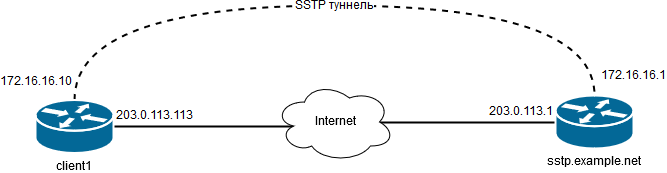
Сертификат будем использовать от Let’s Encrypt. Так что нам потребуется сертификат DST Root CA X3 (x3.pem), Let’s Encrypt Authority X3 (le.pem), сертификат и приватный ключ для sstp.example.net (sstp.example.net.pem).
Серверная сторона (Site)
Импортируем x3.pem, le.pem и sstp.example.net.pem в меню System > Certificates > Import.
Устанавливаем имя серверного Mikrotik:
/system identity
set name=sstp.example.net
Создаём пул IP-адресов для клиентов:
/ip pool
add name=sstp-pool ranges=172.16.16.100-172.16.16.250
Создаём профиль:
/ppp profile
add change-tcp-mss=yes name=sstp-srv-profile local-address=172.16.16.1 \
  remote-address=sstp-pool use-encryption=yes
Включаем SSTP-сервер:
/interface sstp-server server
set authentication=mschap1,mschap2 certificate=sstp.example.net.pem_0 \
  default-profile=sstp-srv-profile enabled=yes
Создаём пользователя:
/ppp secret
add name=client1 password=pass profile=sstp-srv-profile \
  remote-address=172.16.16.10 service=sstp
Создаём статический сетевой интерфейс для клиента:
/interface sstp-server
add name=sstp-in-client1 user=client1
Разрешаем входящие подключения на SSTP-сервер:
/ip firewall filter
add action=accept chain=input dst-port=443 protocol=tcp
Клиентская сторона (Client)
Импортируем x3.pem и le.pem в меню System > Certificates > Import.
Создаём подключение:
/interface sstp-client
add authentication=mschap1,mschap2 connect-to=203.0.113.1 disabled=no \
  name=sstp-out-1 user=client1 password=pass \
  profile=default-encryption  verify-server-certificate=yes
Добавляем NAT:
/interface sstp-client
/ip firewall nat
add action=masquerade chain=srcnat out-interface=sstp-out-1